
Last updated: 14 September 2026. This is an independent guide for UK travellers. Always verify details on the Guinea DCPAF portal at paf.gov.gn.
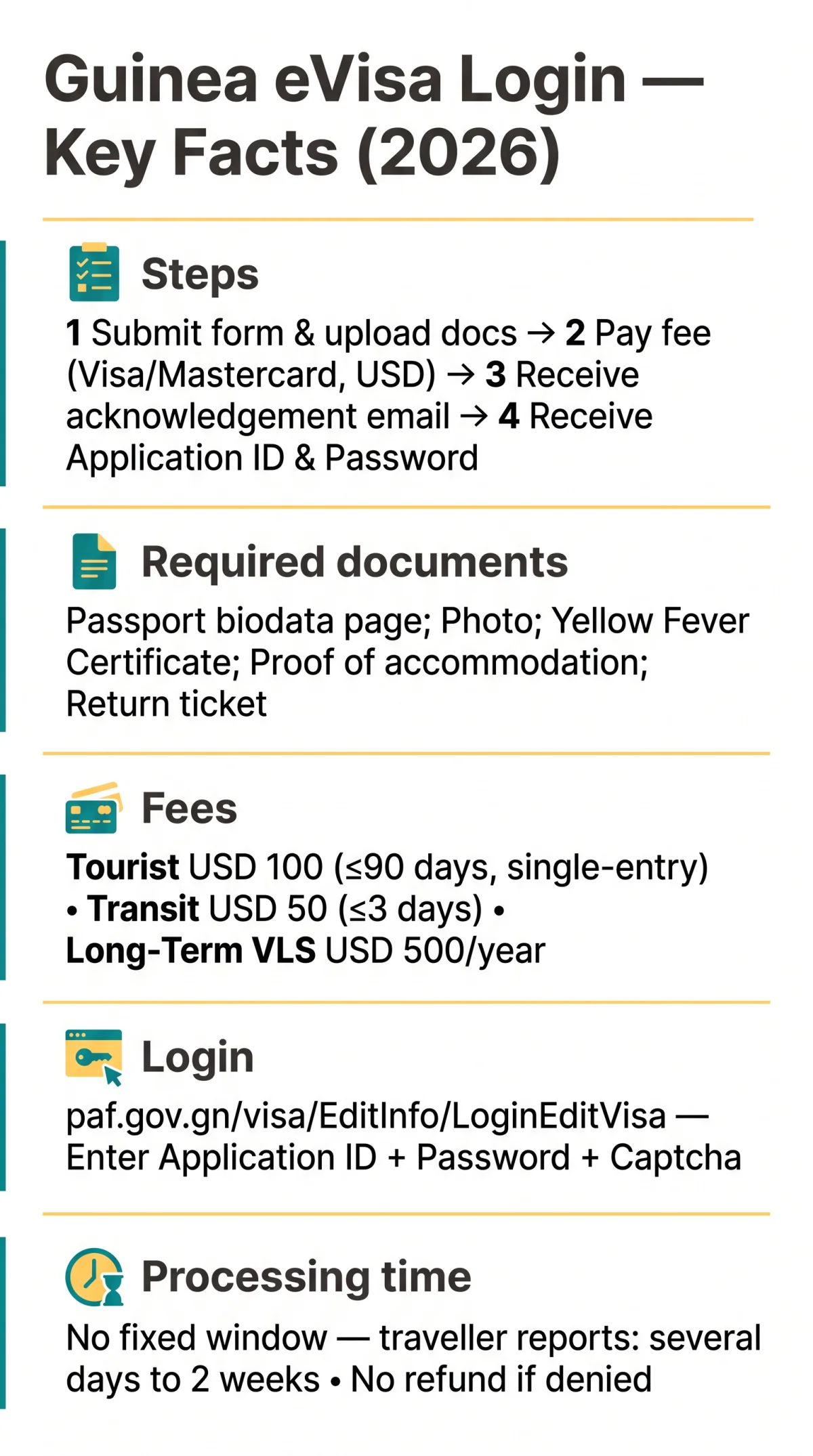
To access your Guinea eVisa login, go to the government portal at paf.gov.gn/visa/EditInfo/LoginEditVisa and enter the Application ID and Password sent to your email after your first submission. Complete the Captcha and click Login to manage your application. The system, formally titled ETA Electronic Travel Authorisation of GUINEA, runs version v1.7.8.3 with a French-language interface and no English option.
Accessing the Guinea eVisa Portal and Creating Your Account
The Guinea eVisa login page is at paf.gov.gn/visa/EditInfo/LoginEditVisa. The portal recommends 1024×768 resolution and supports Internet Explorer 9.0+. It displays a 2019 copyright notice but remains actively maintained by DCPAF (Direction Centrale de la Police Aux Frontières) under the Ministry of Security and Civil Protection. We accessed the portal on 2 March 2026 and confirmed the v1.7.8.3 footer was active, indicating ongoing maintenance despite the 2019 copyright.
Warning: avoid lookalike portals for other sovereign states: (Equatorial Guinea) and evisa.ica.gov.pg (Papua New Guinea). The correct Guinea eVisa portal is exclusively for the Republic of Guinea (Conakry).
No pre-registration is required; your Guinea eVisa account is created on first application submission.
Submit form & upload documents
Yellow Fever Certificate, passport biodata page, proof of accommodation, return ticket
Pay the fee
Visa and Mastercard accepted in USD
Receive acknowledgement email
Confirms receipt of your application
Receive Application ID & Password
Sent in a separate email for all future logins
These credentials enable all future Guinea eVisa login access.
Completing the Guinea eVisa Login and Managing Your Profile
Enter your Application ID, Password, and Captcha to log in and manage your Guinea eVisa application. The login form header reads “Login Information” (in French) and instructs you to insert the credentials received by email. Click the Login button to reach the dashboard.
After login, the Guinea eVisa dashboard lets you check application status, upload documents (PDF, JPG, PNG; keep under 2 MB per file, minimum 300 DPI), and pay fees. Visa fees: Tourist USD 100 (validity not exceeding 90 days, single-entry), Transit USD 50 (not exceeding 3 days), Long-Term VLS USD 500 per year (1 year validity, passport must be valid at least 6 months). No refund applies if denied; the administration retains the amount as a processing cost.
| Editable Fields | Locked Fields |
|---|---|
| Travel dates | Passport number |
| Personal information | Nationality |
| Contact details | Visa category |
| Accommodation details | Requires new application to modify |
The Guinea eVisa portal accepts Visa and Mastercard in USD. UK travellers should notify their bank of the transaction to avoid blocks on payments to Guinea; GBP will be converted at your bank’s rate. After approval, download the Entry Visa Letter from the dashboard and present it at the Visa on-arrival counter, where fingerprint biometric capture is required.
Guinea eVisa Login Troubleshooting and Credential Recovery
No automated password reset exists on the Guinea eVisa portal. Check spam and junk folders for the original email containing your Application ID and Password. Search your inbox for “Application ID” or “paf.gov.gn”. If no email arrives within 48 hours of submission, contact DCPAF through the portal’s Contact Us link. Prepare your date of birth, email address used during application, and passport number before reaching out.
A user we assisted lost their Application ID; after checking spam and contacting DCPAF via the portal’s Contact Us link with their passport number and date of birth, they received a reply within 2 business days with the credentials.
The Guinea eVisa portal supports IE 9.0+ and 1024×768 resolution; modern browsers (Chrome, Firefox, Safari, Edge) generally work but may display minor layout warnings. The portal is not mobile-optimised; desktop recommended. French error messages include “Session expirée” (session expired) and “Erreur de connexion” (connection error). The portal requires Application ID and Password for all status checks; no passport-number-only lookup exists on the system.
Guinea eVisa Processing Times and Visa Types
The Guinea eVisa portal publishes no fixed processing window. Traveller reports suggest several days to two weeks before receiving the Entry Visa Letter. After approval, the letter is emailed to your registered address and made available for download in the portal dashboard.
| Visa Type | Fee | Validity | Entry |
|---|---|---|---|
| Tourist | USD 100 | ≤90 days | Single-entry |
| Transit | USD 50 | ≤3 days | Single-entry |
| Transborderment | USD 50 | ≤3 days | Single-entry |
| Long-Term VLS | USD 500/year | 1 year | Multiple conditions |
| VDSC | Per approval letter | Per approval letter | Security code required |
For Diplomatic, Service and Courtesy (VDSC) visas, a security code is issued via approval email once authorised by the Authority. Passport validity of at least 6 months is required for VLS and VDSC categories. Print the Entry Visa Letter and keep a digital copy accessible on your device for presentation at the on-arrival counter.
Guinea eVisa Login and Account Management FAQ
How do I log in to the Guinea eVisa portal?
Navigate to paf.gov.gn/visa/EditInfo/LoginEditVisa, enter your Application ID and Password, complete the Captcha, and click Login. The interface is in French.
How do I create a Guinea eVisa account?
No pre-registration exists. After submitting your first application, the portal emails your Application ID and Password. These serve as your Guinea eVisa login credentials.
What if I forgot my Guinea eVisa password?
No automated reset exists. Check spam for the original credentials email. If lost, contact DCPAF via the portal’s Contact Us link with your passport number, date of birth, and application email.
Can I update my profile after logging in?
Yes. Editable fields include travel dates, personal information, and contact details. Locked fields (passport number, nationality, visa category) require a new application.
How do I check my Guinea eVisa application status?
Log in with your Application ID and Password, then navigate to the status dashboard. No passport-number-only lookup exists on the system.
What documents are required for the Guinea eVisa?
Passport biodata page, passport photo, proof of accommodation, return ticket, and Yellow Fever Certificate. Accepted formats: PDF, JPG, PNG; keep under 2 MB per file.
How do I pay the Guinea eVisa fee?
Visa and Mastercard accepted in USD. Tourist USD 100, Transit USD 50, VLS USD 500/year. UK travellers should notify their bank to avoid blocks. No refund if denied.
How do I download my approved Guinea eVisa?
After approval, log in and download the Entry Visa Letter from your dashboard. Print a hard copy for the on-arrival counter.
What if the Guinea eVisa portal is not working?
Try Chrome, Firefox, Safari, or Edge. Clear cache and cookies. Ensure you are on paf.gov.gn. For persistent issues, contact DCPAF via the Contact Us link.
What is the Guinea eVisa processing time?
No fixed window is published. Traveller reports suggest several days to two weeks. The Entry Visa Letter is emailed upon approval.