
To check your Guinea eVisa status in 2026, enter your Application ID and Reference Number on the Guinea eVisa tracking portal at paf.gov.gn. The system displays your current status: Processing, Approved, or Rejected. Approved eVisas can be downloaded as a PDF and must be printed before travel.
This is an independent, unofficial guide for UK travellers. We are not affiliated with the Republic of Guinea or PAF. We tested the Guinea eVisa tracking portal from the UK on 2 September 2026; the steps below reflect that live check. Last reviewed on 9 September 2026.
What You Need Before Checking Your Guinea eVisa Status
BLUF: Checking your Guinea eVisa status requires two credentials from the confirmation email: Application ID and Reference Number (password).
The Guinea eVisa status check requires two credentials: the Application ID and the Reference Number (referred to on the portal as the password sent by email). The Application ID follows an illustrative format such as GN-2026-XXXXXX – treat this as an example, not a confirmed structure. The portal may also request your passport number as additional verification.
Where to Find Your Application ID and Reference Number
Your Guinea eVisa Application ID and Reference Number are in the email confirmation sent immediately after submission. Search inbox for “Guinea” or “eVisa”; if missing, check spam/junk – automated visa emails are frequently filtered there. Copy them exactly, including any hyphens or capital letters, as the tracking form fields are case-sensitive. If you lose the confirmation email, recover credentials via the portal’s support channels.
How to Check Your Guinea eVisa Status Online Step by Step
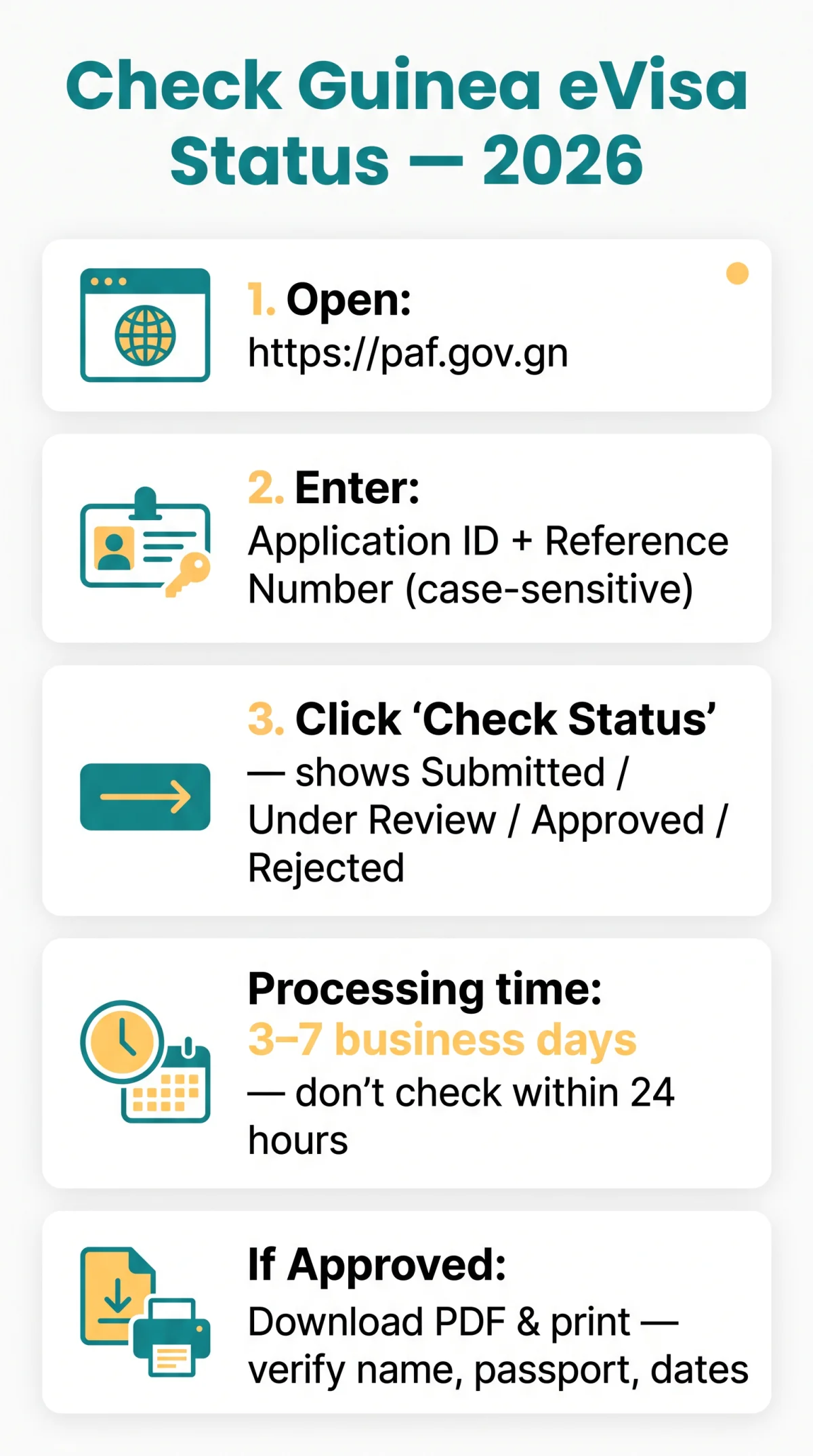
BLUF: To check a Guinea eVisa status, visit paf.gov.gn, enter the Application ID and Password sent to your email, then click “Check Status” to view the result.
Open the portal
Go to https://www.paf.gov.gn/ – no VPN needed from the UK.
Enter your credentials
Input your Online Application ID and the Password sent to you by email. Both fields are mandatory and case-sensitive.
Submit and read your status
Click the ‘Check Status’ button. The portal will retrieve your current application status immediately.
Understanding Your Guinea eVisa Status Results and Downloading
BLUF: The Guinea eVisa portal returns one of four statuses – Submitted, Under Review, Approved, or Rejected – each with a defined next step. Standard processing is estimated at 3-7 business days (no confirmed 2026 data exists; expect longer during Guinean holidays).
| Status | Meaning | What to Do Next |
|---|---|---|
| Submitted | Application logged; awaiting review | Wait 24-48 hours before checking again |
| Under Review | Officer is evaluating your application | No action needed; check back in 2-3 days |
| Approved | Visa is ready for download | Download the PDF and print it |
| Rejected | Application was not approved | Review the reason; reapply or contact PAF |
How Long Each Status Typically Lasts
Guinea eVisa processing takes 3-7 business days (estimate). Delays occur due to Guinean holidays, peak seasons, incomplete docs, or payment verification. Do not check within 24 hours of submission – the system may not have logged your application yet.
How to Download Your Approved Guinea eVisa
Once the Guinea eVisa status check shows your approval status as “Approved,” locate the “Download” button on the results page and save the PDF approval letter to your device. Print it on A4 paper (colour or black-and-white). Verify that your name spelling, passport number, and validity dates match your passport exactly before travelling.
Troubleshooting Guinea eVisa Status Check Errors
BLUF: The most frequent Guinea eVisa tracking errors – “Invalid Application ID” and “No Record Found” – are typically caused by typos, case sensitivity, or checking within 24 hours of submission. For unresolved issues, contact PAF via paf.gov.gn with your Application ID and passport number ready.
“Invalid Application ID” – check copy/paste accuracy and case sensitivity. “No Record Found” – wait 24-48h or verify payment. Ensure you are on the Republic of Guinea (Conakry) portal at paf.gov.gn – the Equatorial Guinea portal will not recognise your credentials.
Lost credentials? Check spam, search inbox for “Guinea visa”, or contact PAF with passport number and submission date.
When to Contact Guinea Immigration Support
For unresolved Guinea eVisa status check errors, navigate to the “Contact Us” page on paf.gov.gn and submit an enquiry. Have your Application ID, passport number, and submission date ready. UK travellers may also consult FCDO travel advice for Guinea at gov.uk as an external reference.
Guinea eVisa Status Tracking FAQ
How long does it take to get a Guinea eVisa after applying?
Standard processing is typically 3 to 7 business days. Guinean public holidays, peak travel seasons, incomplete documentation, and payment verification delays can extend the wait. It is advised not to check your status within 24 hours of submitting your application form, as the system needs time to log your details.
Do I need my passport number to check my Guinea eVisa status?
The primary credentials required to sign in are the Application ID and the password sent to your email. The portal may also ask for your passport number as additional verification. Always have your passport ready when attempting to track progress on the eVisa portal.
Can I check my Guinea eVisa status from the UK before I travel?
Yes. The tracking portal at paf.gov.gn is accessible from the UK without a VPN. You can monitor your eVisa status online at any time after submitting your application, making it easy to track progress before your departure.
What should I do if my Guinea eVisa status says ‘No Record Found’?
Wait 24 to 48 hours after submission, as your application may not yet be in the system. If the error persists, verify you entered the correct Application ID without typos and check case sensitivity. Ensure you are using the Republic of Guinea portal, not Equatorial Guinea.
How do I download my Guinea eVisa after it is approved?
On the status results page, click the “Download” button to download your visa as a PDF approval letter. Print it on A4 paper and carry it with your passport to the airport. Verify that your name, passport number, and validity dates match exactly before travelling.
What if my Guinea eVisa application has been rejected?
The portal will display “Rejected” with a reason summary. You may reapply with corrected information or contact PAF for guidance on the specific reason. Use the Contact Us page on paf.gov.gn to reach Guinea immigration support with your Application ID ready.
How can I retrieve a lost Guinea eVisa Application ID?
Check your spam or junk folder for the email confirmation. Search your inbox for “Guinea” or “eVisa”. If you still cannot locate your Application ID or Reference Number, contact PAF via their website with your passport number and submission date for recovery assistance.
Is the Guinea eVisa portal accessible without a VPN?
Yes, the portal at paf.gov.gn is directly accessible from the UK without a VPN. British travellers can log in and track their eVisa status online seamlessly.
Verification sources: hands-on review of paf.gov.gn on 2 September 2026; FCDO travel advice for Guinea at gov.uk (accessed 9 September 2026). The 3-7 business-day processing estimate is a common industry figure; no confirmed 2026 publication was found, and we flag this uncertainty in the guide. If you notice the status-check portal has changed, please contact us so we can re-verify before your departure.